About Interlibrary Loan
Members of the JMU community may obtain items that are not available in the Libraries collections through Interlibrary Loan (ILL). This service is limited to JMU faculty, students, and staff. All non-JMU users, including those with library-issued borrower cards, should contact their local public library, workplace library, or other appropriate institution to obtain Interlibrary Loan service.
Submitting ILL Requests
All requests must be submitted through your Interlibrary Loan Account. Prior to submitting a request, please make sure your address and preferred delivery location are entered in the User Information section of your ILL Account Settings page.
Please note that items received via Interlibrary Loan are intended for personal use and cannot be placed on course reserve, and requests cannot be transferred to other ILL user accounts.
Request Tips
- Complete all request fields accurately and thoroughly.
- Avoid abbreviations whenever possible.
- Include the source of your citation in the "Notes" field to help ILL staff locate additional information, needed.
- Specify any specific format needs (e.g. print instead of microfilm or electronic) - ILL staff will contact you if a preferred format is unavailable.
Request in Library Search
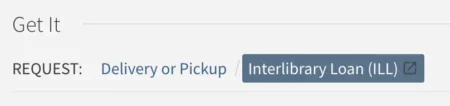
You can also initiate ILL requests within our Library Search tool. When viewing a library item you want, select the "Interlibrary Loan" option in the "Get It - Request" section of the page. This will open your ILL account and allow you to complete the request.
Item Pick-Up and Delivery Options
Before submitting an ILL request, please ensure the Delivery Location field is set in the User Information section of your ILL Account Settings page.
Items can be picked up by you or an authorized user designated in your ILL Account Settings.
Items designated as "In Library Use Only" will be held at the circulation desk for use at JMU Libraries Express.
All other items will be delivered to the pick-up or delivery location specified on your ILL Account Settings page.
Pick-Up from a Library Location
Your items will be available for pick-up at the front desk of your selected library:
- JMU Libraries Express: 1050 S. Main St.
- Music Library: Music Building Room B59
- Rose Library: Main lobby
- Memorial Hall: Educational Technology Media Center (ETMC) Room 7260
Mail Delivery
- Departmental (MSC) Delivery:
Available to faculty, staff, and doctoral students. Your Mail Stop Code (MSC) should be included in the Address section of your ILL Account Settings page. - Distance Learner Delivery:
Available to patrons who qualify as Distance Learners. Items will be mailed directly to your home address as listed on your ILL Account Settings page.
Renewals
To renew an Interlibrary Loan item:
- Log in to your ILL account.
- Locate the item in your "Checked Out Items" list and click the "Renew" link below the title.
- If online renewals are available, click the "Request Renewal" button.
- If online renewal is unavailable, contact interlib@jmu.edu to discuss your options.
Renewal Restrictions
- Renewal requests must be submitted on or before the due date.
- Renewal are not accepted for items that have already been renewed or that are overdue by 30 days or more.
- Renewals are granted at the discretion of the lending library; if your renewal request is denied, the item must be returned to JMU Libraries immediately.
Returns
All Interlibrary Loan items must be returned to JMU Libraries on or before the date indicated on the book strap, unless they are eligible for renewal.